


Top Alternatives to Expensive Web Scraping Tools (2026)
By Ahmad Software
•
May 7, 2026
What do lower-cost scraping tools actually give you?
Enterprise scraping platforms routinely cost $500–$2,000 per month. This review looks at five lower-cost tools — Ahmad Software, Octoparse, ParseHub, Browse.AI, and Simplescraper — covering what each one extracts, how it stores data, what it costs annually, and which workflows it actually fits. No rankings, no affiliate links — just a factual comparison for buyers deciding between options.Web Scraping Tools Compared: Price, Data Storage & Use Case
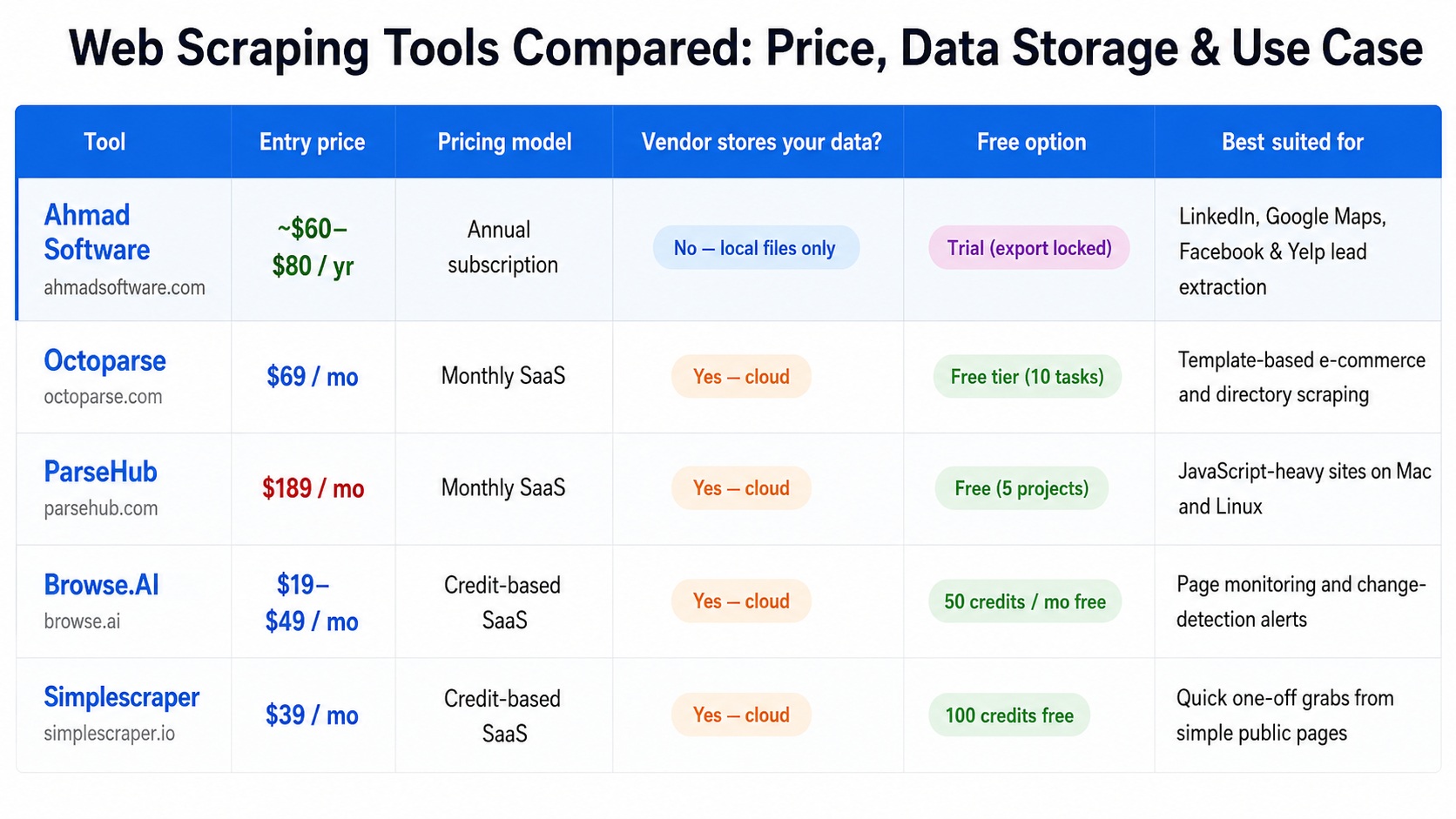
Why Businesses Look for Alternatives to Expensive Web Scraping Platforms
- High monthly costs
- Usage limits
- Credit-based pricing
- Cloud storage concerns
- Technical complexity
- API dependency
How the web scraping market divides by price
1. Cloud-Based Scraping Platforms
Run scrapers on vendor-managed servers.
Include proxies, CAPTCHA solving, scheduling, APIs, and cloud storage.
Higher infrastructure costs lead to recurring monthly or usage-based pricing.
Best for large-scale automation and developer workflows.
Examples: Bright Data, Apify, Zyte, Oxylabs.
2. Desktop-First & Browser-Based Tools
Run on the user's computer or browser.
Minimal infrastructure overhead and no continuous server costs.
Lower pricing through one-time licenses or affordable subscriptions.
Best for lead generation, recruitment, market research, and non-technical users.
Examples: Ahmad Software, Simplescraper, and similar desktop extraction tools.
What is this tool primarily designed for?
Ahmad Software
Ahmad Software Technologies is a lead generation and data extraction platform focused on helping sales teams, recruiters, marketers, and agencies collect business data from public sources. Its product suite includes specialized tools for LinkedIn, Google Maps, business directories, website email extraction, and prospecting workflows.Octoparse
Octoparse is a no-code web scraping platform designed for extracting structured data from websites at scale. It provides a visual workflow builder and cloud automation features, making it suitable for users who need to scrape data from a wide variety of websites without writing code.ParseHub
ParseHub is a visual web scraping tool built for extracting data from complex and dynamic websites. It supports interactive elements such as forms, dropdowns, and JavaScript-rendered content, making it useful for custom data collection projects and research applications.Browse AI
Browse.AI is a cloud-based data extraction and website monitoring platform. In addition to scraping data, it focuses on tracking website changes, monitoring competitors, and automating workflows through integrations with popular business applications.Simplescraper
Simplescraper is a browser-based scraping tool designed for quick and straightforward data extraction. It enables users to collect structured website data directly from their browser and export it to spreadsheets, databases, and automation platforms with minimal setup.Best Tool For
The five tools in this comparison do not compete directly with each other in all cases.The decision usually comes down to what data is needed, how often it is needed, and whether the workflow requires cloud execution or can tolerate a desktop-only setup.
Task-to-Tool Mapping
- Ahmad Software
Extracting contact lists from LinkedIn, Google Maps, Facebook, or Yelp for sales or recruitment outreach
Octoparse
Recurring scrapes of e-commerce sites, directories, or structured data sources using existing templates
ParseHub
Scraping JavaScript-heavy or AJAX-dependent sites on Mac or Linux where other visual tools fail
Browse.AI
Monitoring specific pages for changes — competitor pricing, job board updates, stock availability alerts
Simplescraper
Quick, one-off data grabs from simple public web pages without any installation or setup
What Makes Ahmad Software Different?
Most scraping tools are generic data extraction platforms.Ahmad Software is purpose-built for lead generation, recruitment, and business prospecting, with dedicated tools for LinkedIn, Google Maps, Facebook, Yelp, Yellow Pages, and email discovery.
Best Web Scraping Tool by Use Case
-
Need----------------------Recommended Tool
Lead Generation -------- Ahmad Software
Google Maps Leads-------- Ahmad Software
LinkedIn Prospecting-------- Ahmad Software
Website Monitoring --------Browse AI
General-Purpose Scraping-------- Octoparse
JavaScript-Heavy Sites--------ParseHub
