Software that Evolves with Your Business.
Advanced LinkedIn Profile Scraper for Sales Navigator Lead ExtractionSales Navigator Profile Scraper helps you identify the right prospects by aligning with your industry, location, role, and buyer profile—making it easier to connect with decision-makers, build relationships, and drive sales outcomes.
Boost your sales and run an effective sales campaign with our B2B Sales Prospecting Extractor. This tool acts as an automated profile scraper, streamlining the extraction of target lead lists directly from advanced search results. Say goodbye to manual data collection—scrape targeted leads, including names, job titles, companies, industries, public emails, and profile URLs.
Extract complete business contact details from professional platform search results.
Extract company website URL, Job Titles & Positions to approach the right lead.
Supports professional platform search filters to target prospects with advanced criteria and custom keywords.
Saves viewed profiles and search history to avoid duplicate data extraction and track your progress.
Features network interruption detection to auto-pause/resume scraping during connection issues.
Supports Unicode character sets for accurate multilingual data extraction and saving.
Extract B2B lead data in just three simple steps
Download and install our desktop application to get started.
Perform your highly targeted search on the professional web platform using your preferred parameters.
Click the designated button to extract and export your prospects to Excel, CSV, or TXT.
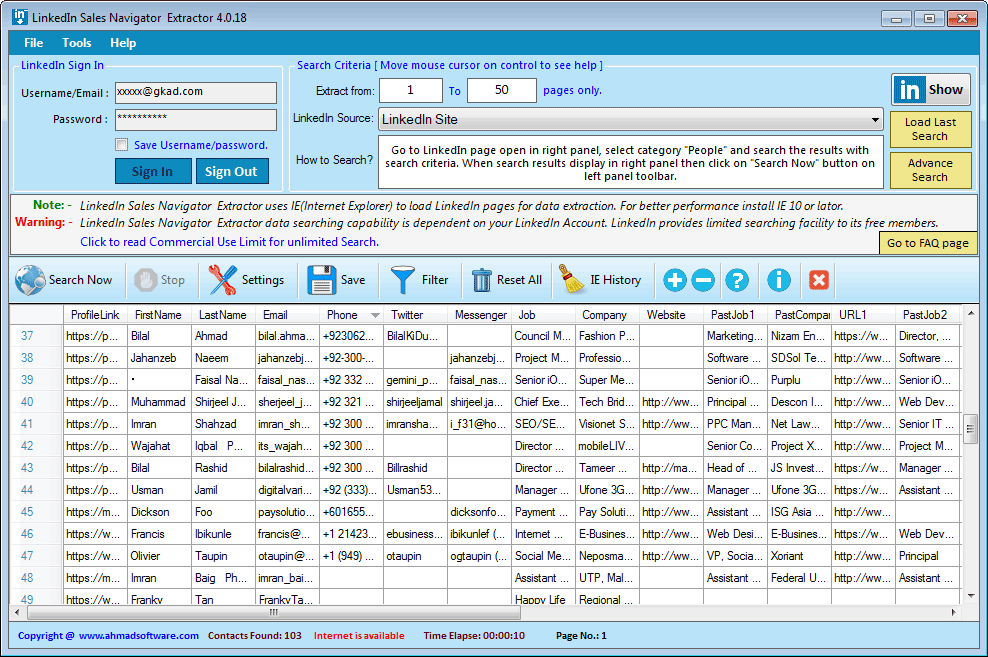
Below is a real-time view of the Sales Leads Extractor software dashboard. Notice how the extracted data is neatly organized into columns, ready for a single-click export.
"We needed a reliable way to build niche prospect lists from professional sites. This extractor delivered exactly what we needed."
“The speed and accuracy are impressive. It helped our team scale enterprise-level prospecting without manual effort or missed data."
"Simple to use, dependable, and effective. It turns online search results into actionable lead lists we can use immediately."
Choose the plan that works best for your business needs.
Three-Months subscription
Six-Months subscription
One-year subscription
Web platforms enforce daily and monthly viewing limits depending on account levels. These limits affect how much data can be retrieved. Please review general industry thresholds below:
| Account Type | Daily Profile View Limit | Notes |
|---|---|---|
| Standard Account | Up to 100 profiles/day | Monthly limits vary by network size |
| Business Account | Up to 300 profiles/day | Higher trust & visibility |
| Executive Account | Up to 400 profiles/day | Ideal for talent sourcing |
| Professional Premium | Up to 500 profiles/day | Expanded daily reach |
| Advanced Sales Tier | Up to 1,200 profiles/day | Recommended: Stay within 1,000/day for safety |
You can extract names, job titles, verified email (publicaly available), phone numbers, company details, , and profile URLs (1st-degree connections)
1st-degree: Directly connected members. Email/Phone usually visible.
2nd-degree: Connected to your 1st-degree contacts.
3rd-degree: Connected to your 2nd-degree contacts.
Note: Contact details for 2nd/3rd degree are only available if the user made them "Public".
Absolutely. You can scrape LinkedIn Sales Navigator searches, saved lists, or individual profiles. Simply perform your targeted search using Sales Navigator’s advanced filters, and the software will systematically crawl the results to build your database.
Yes. Sales Navigator allows higher profile view limits (up to 1,200 per day) compared to a basic account, using this Sales Navigator lead extractor ensures you can scale your targeted lead generation effectively.
Yes, This tool extracts only publicly visible data from your logged-in LinkedIn session. Always use it responsibly with LinkedIn’s usage policies.
Yes. Recommended LinkedIn Daily Profile View and extraction limitations guidelines are provided to help you avoid platform restrictions or blocks.
The tool allows you to configure which fields you want to capture, enabling focused extraction making it easier to connect with decision-makers, and drive sales outcomes.
Yes, you can download and test the software before purchasing to ensure it meets your needs.
After installing the software, click "Activate Full Version," copy the serial key, and contact support to generate a trial license.
Our extractor tools are intended for personal, ethical, and lawful use only. Ahmad Software Technologies is not responsible for any misuse, unethical activity, or illegal data handling. The extraction process simply automates actions that can also be performed manually.
#LinkedInSalesNavigatorExtractor #SalesNavigatorExtractor #LinkedInLeadGeneration #ExtractDataFromLinkedIn #LinkedInEmailExtractor #LinkedInScraper #LinkedInDataExtractor #SalesNavigator #LinkedInLeads #LinkedInDataScraper #LeadGenerationLinkedIn #EmailGrabber #AhmadSoftware #B2BLeads #SalesAutomation
Interesante