Software that Evolves with Your Business.
High-Speed Crawling • Millions of Pages per Search • AI-Assisted Keyword Research • Targeted Email Extraction Cute Web Email Extractor is Windows email extractor software for finding publicly available email addresses from websites, search-engine results, online documents, and local files. It combines AI-assisted keyword research with ChatGPT and Gemini, synonym-enhanced keyword search, and synonym-enhanced email filtering to help users discover relevant websites and identify targeted email data. Its high-speed web crawling, bulk URL extraction, browser-based scraping, duplicate removal, domain validation, and data export capabilities help users build targeted business contact lists for lead generation.
Six different teams use Cute Web Email Extractor to solve the same core problem: too many leads to gather manually, too little budget for overpriced databases.
Client campaigns move fast and your list-building workflow needs to keep up — without billing hours to manual research or waiting on a data vendor's refresh cycle. Run multiple extraction jobs simultaneously, segment by niche and geography, and deliver clean, verified contact lists to clients within hours, not days.
You're burning budget on a contact database where half the emails bounce and the data is 18 months stale — and your SDRs are spending hours on manual verification instead of selling. Pull fresh, live contact data directly from company websites and industry directories, filtered to your exact ICP by keyword, industry, and geography.
You need a full pipeline but you're not at the stage where a five-figure data platform contract makes sense — and per-lead pricing from cloud tools adds up fast at any real volume. Unlimited extraction at a flat annual rate means you can run as many campaigns as you need without watching a credit counter drain every time you hit export.
Selling lead lists as a service requires speed, clean output, and low overhead — tools that charge per lead eat directly into your margin on every job. Run parallel extraction jobs across multiple client verticals, export structured data in CSV or Excel, and hand off ready-to-use contact files with no extra cleanup step.
Sourcing candidate contacts from job boards, company websites, and professional directories manually is slow and doesn't scale when you're filling multiple positions at once. The bulk URL crawling mode lets you process hundreds of employer or candidate sources in a single run, extracting contact data without platform-by-platform manual lookup.
Business intelligence projects require structured email datasets at scale — and the tools designed for marketers often impose extraction caps that make large-scale collection impractical. Configurable crawl depth, domain filtering, TLD targeting, and flexible export formats give you the control you need for research-grade data collection with no artificial limits.
See Cute Web Email Extractor dashboard in real time. All extracted email data is clearly organized into structured columns, making it easy to review and export.
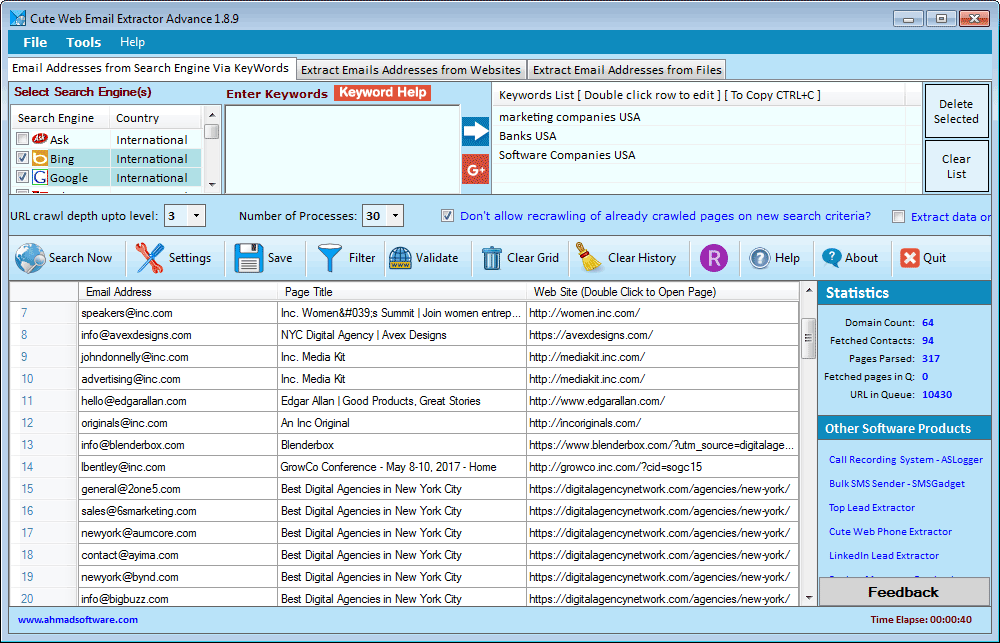
No developer. No API keys. No configuration files. The entire workflow runs inside a Windows desktop application you can install and use within minutes.
Download and install Cute Web Email Extractor on your Windows machine. No technical configuration required. Ready to run in minutes.
Type a keyword, industry term, or paste a bulk URL list. The built-in AI keyword research engine automatically expands your input into related search terms and industry variations.
Click extract. The tool removes duplicates, filters invalid addresses, validates domains, and exports clean data to XLSX, CSV, or TXT.
Master the core features of Cute Web Email Extractor with our official video guides.
Learn how to properly launch the software and configure the Auto-Save Directory to safeguard extraction results and prevent data loss.

Step-by-step tutorial on importing bulk website domains or URLs and automatically collecting email contact leads.
How to extract emails from modern JavaScript-rendered websites using the built-in browser engine mode.
Watch our full step-by-step video training playlist covering proxies, captchas, custom filters, and advanced extraction.
Every feature listed below is available in the standard license at $59.99/year. There are no feature tiers, no add-on modules, and no capability gating behind a higher plan.
Search using keywords in any language and crawl multilingual websites to extract publicly available email addresses from relevant web pages and online content. The software can process multilingual web content without limiting your searches to English-language keywords.
The AI-assisted workflow can generate related keywords, industry-specific terms, synonyms, commercial-intent phrases, and audience-specific variations. These expanded keywords can then be used in Cute Web Email Extractor to discover a broader and more targeted set of websites and pages for email extraction.
Geographic targeting is built into the crawl engine, not bolted on afterward. You can restrict searches to specific top-level domains such as .com, .co.uk, .de, or any country-specific TLD, focusing your extraction on the geographic markets that matter to your campaign without manually filtering a global result set after the fact.
When you already know the websites you want to target, bulk import mode lets you paste hundreds or thousands of domains and URLs directly into the software and set how deeply the crawler follows links within each site. This is the fastest path from a target account list to a verified contact list for account-based sales and agency client campaigns.
The crawling engine runs multiple simultaneous threads, allowing it to process millions of pages in a single extraction run depending on your crawl settings, target website response times, and network conditions. High-volume lead generation campaigns that would take days of manual work or multiple tool subscriptions run in a single session on a standard Windows machine.
Standard crawlers read only the initial HTML response — which means they miss every email address loaded by JavaScript, AJAX calls, or dynamic page rendering. The built-in browser engine fully renders modern web pages before extraction, capturing email data from single-page apps, social platforms, and dynamically loaded contact sections that other tools cannot reach.
High-volume crawling across competitive target websites can trigger rate limiting and IP blocks without proxy rotation. Cute Web Email Extractor supports all four major proxy protocols, letting you configure IP rotation for uninterrupted extraction jobs regardless of the volume or target site restrictions you are working around.
Raw email extraction without filtering produces lists full of support addresses, no-reply inboxes, image file extensions misread as addresses, and duplicates that damage sender reputation. The filtering engine applies pattern matching, domain validation, duplicate removal, prefix and suffix rules, and obfuscation normalization before any data reaches your export file.
Not all contact data lives online. The local file extraction mode parses email addresses from PDF, Word, Excel, HTML, and TXT files stored on your computer without requiring an internet connection, making it useful for processing exported directories, downloaded reports, or client-provided document batches.
Control exactly which pages the crawler follows and processes. Exclude specific URLs or domains using URL keywords, prioritize URLs containing targeted terms, or optionally crawl only URLs that match your specified keywords.
You can also control link following by requiring pages to contain specific keywords, with options for exact keyword matching and page-title-only validation.
Control which pages are eligible for email extraction using inclusion and exclusion keywords. The software can follow or process pages containing required terms, skip pages containing unwanted terms, match keywords in page titles, or require all specified keywords to be present.
You can also find and replace unwanted text before extraction and remove selected content before email parsing.
Configure crawl depth, maximum pages, request delays, search-engine page limits, per-domain extraction limits, concurrent connections, request timeouts, memory usage, cookies, duplicate-crawl prevention, SSL validation, and other crawling behaviors.
Choose which supported content types the crawler processes, including HTML, PDF, JSON, Excel, Word, and other configured MIME types. Selective MIME processing can help reduce unnecessary downloads and focus extraction on relevant content.
Most email finder tools charge you per lead, cap your monthly usage, and query a pre-built database that was last refreshed months ago. Here is how that compares to extracting from the live web at a flat annual price.
| Feature |
Cute Web Email Extractor $59.99/year |
Hunter.io from $49/mo |
Apollo.io from $49/mo |
Snov.io from $30/mo |
|---|---|---|---|---|
| Annual cost (entry tier) | $59.99 flat | $588+ | $588+ | $360+ |
| Extraction limit | ✓ Unlimited | ✕ 500–10k/mo | ✕ Credits system | ✕ Credits system |
| Data source | Live web, any site | Pre-built database | Pre-built database | Pre-built database |
| JavaScript / AJAX websites | ✓ Built-in browser engine | ✕ No | ✕ No | ✕ No |
| AI keyword research | ✓ ChatGPT + Gemini | ✕ No | ✕ No | ✕ No |
| Extract from PDF / local files | ✓ PDF, Word, Excel, TXT | ✕ No | ✕ No | ✕ No |
| Proxy support | ✓ HTTP, HTTPS, SOCKS4/5 | ✕ No | ✕ No | ✕ No |
| Works offline | ✓ Local file mode | ✕ Cloud only | ✕ Cloud only | ✕ Cloud only |
| No coding required | ✓ Desktop installer | ✓ | ✓ | ✓ |
| Free trial | ✓ Full-feature trial | ✓ Limited free plan | ✓ Limited free plan | ✓ Limited free plan |
Disclaimer: All third-party product names, trademarks, and registered trademarks (including Hunter.io, Apollo.io, and Snov.io) are the property of their respective owners. Their use in this table is purely for descriptive, comparative purposes based on publicly available data and standard plan features. Ahmad Software Technologies is not affiliated with, endorsed by, or sponsored by any of these third-party services.
The real difference is the data source: Hunter, Apollo, and Snov query a database — one they built by crawling the web months or years ago. Cute Web Email Extractor is the crawler. You run it against any website, any directory, any niche on the live web today. No database age limits. No credit ceiling. No $500/month contract.
Database tools ration access via monthly credit pools. When the credits dry up, the campaign stops — and refilling them costs more than your original plan. A flat $59.99/year license has no credit ceiling, no refill fees, and no mid-campaign surprises.
Pre-built databases index popular industries well. Niche verticals, regional directories, and recently launched companies are underrepresented or missing entirely. Live web extraction reaches any public website — if the email is on the page, the tool finds it.
Professionals change jobs every 2–3 years. A database refreshed quarterly is already stale for high-churn industries. Cute Web Email Extractor pulls from the live web on the day you run it — so the email addresses you export reflect what's actually published today.
No monthly fees · No extraction limits · No credit card required for trial
The software extracts information that is publicly available on the web. It does not generate or guess email addresses. Users are responsible for ensuring that their use of extracted data complies with applicable laws, regulations, privacy requirements, and third-party terms.
"We are user of several products developed by Ahmad Software Technologies. we are more than satisfied with them as far as quality results are concerned. Simple, easy to use, affordable—and highly recommended."
"This is by far the most reliable email scraper we’ve used. It collects clean, structured email lists that are ready for outreach without extra filtering."
"The embedded browser feature is a game changer. We’re able to extract email addresses from platforms other tools simply can’t handle.”
Pay Once Annually - Enjoy Unlimited Access All Year.
Secure Checkout • Instant License Activation
Cute Web Email Extractor is Windows email extractor software for discovering publicly available email addresses from websites, search-engine results, PDFs, online documents, and other supported web sources. It combines web crawling, AI-assisted keyword research, synonym-enhanced search, email filtering, domain validation, and data export to help users build targeted business contact lists for lead generation.
Email extractor software is designed to discover and collect email addresses from supported websites, search results, documents, URLs, and other data sources. Cute Web Email Extractor is primarily a web email extraction tool for discovering publicly available email addresses and organizing them for business research and lead-generation workflows.
Cute Web Email Extractor can assist with keyword research by expanding a user's search topic into related search terms, industry variations, and other relevant phrases. These expanded terms can be used to discover a broader range of relevant websites before email extraction begins. The software also supports keyword research workflows involving ChatGPT and Gemini.
Yes. Cute Web Email Extractor supports AI-assisted keyword research workflows using ChatGPT and Gemini. Users can use these AI tools to research or generate relevant search keywords and then use those keywords with the software's web email extraction and synonym-enhanced search capabilities.
The software can expand user-defined search keywords with related words and synonyms to discover additional relevant websites. Instead of relying only on one exact search phrase, the expanded search strategy can target related industry terms, audience variations, and other relevant search expressions.
Yes. Cute Web Email Extractor can use keyword-based searches to discover relevant web pages and extract publicly available email addresses from supported search results and websites. Its keyword research and expansion capabilities can help broaden the range of relevant pages discovered during a search.
Yes. The software can extract email addresses from online PDF files as well as PDF files stored locally on your computer. It also supports email extraction from other supported local document formats, including Word, Excel, HTML, and TXT files.
Yes. Its Browser-Based Crawling mode supports JavaScript-rendered and dynamically loaded/AJAX content. This allows the software to extract email addresses from content that may not be present in the initial HTML response. Generic Crawling does not execute JavaScript.
Browser-Based Crawling uses a browser engine and can process JavaScript-rendered and dynamically loaded/AJAX content. Generic Crawling does not execute JavaScript and is designed for websites where the required content is available without browser-based rendering.
The multi-threaded crawling engine is designed for high-volume web email extraction and can process millions of pages in a single search, depending on search settings, website response times, network conditions, and available system resources.
Cute Web Email Extractor supports HTTP, HTTPS, SOCKS4, and SOCKS5 proxies. These proxy protocols can be configured for web crawling and email extraction according to the user's requirements.
The software removes duplicate email addresses, filters invalid email formats, and validates email domains before export. This helps users produce cleaner email datasets for further review and lead-generation workflows.
Cute Web Email Extractor filters invalid email formats and validates email domains. These functions should not be interpreted as a guarantee that an individual mailbox exists or that an email address is deliverable. The software extracts publicly available email addresses and does not generate or guess email addresses.
The software can extract email addresses from supported local files including PDF, Word, Excel, HTML, and TXT files. It can also extract emails from supported online web sources and documents.
Cute Web Email Extractor is Windows-based software compatible with Windows 10, Windows 11, and Windows Server 2016 or later, including supported Windows Server editions. It requires .NET 8, .NET 9, or .NET 10.
Crawl Depth determines how many levels of links the software follows within a website. A lower crawl depth limits the number of pages scanned, while higher levels allow the crawler to follow links deeper into the site's structure.
Yes. Cute Web Email Extractor can run multiple extraction tasks in parallel, depending on the available system resources and task configuration.
There is no fixed software-level extraction limit. The practical number of emails that can be extracted depends on factors such as search settings, website availability, server response times, network conditions, computer resources, and the number of publicly available email addresses.
Yes. Extracted data can be exported in XLSX, CSV, and TXT formats.
Yes. Cute Web Email Extractor provides a trial option. After installing the software, users can obtain a trial license through the activation process and contact AST support for assistance.
Join thousands of digital marketers, sales professionals, and businesses who trust Cute Web Email Extractor to build highly targeted contact lists faster and more accurately than ever before.
Secure checkout • Instant license Activation • No usage charges
Windows 10, Windows 11, Windows Server 2016 or higher
.NET 8 / .NET 9 / .NET 10
Supports HTTP, HTTPS, SOCKS4, and SOCKS5 proxies
11 Languages (English, German, Spanish, French, Portuguese, Japanese, Russian, Chinese, Turkish, Arabic, and Urdu)
Cannot extract text or email addresses embedded inside images (no OCR)
Requires Browser-Based Crawl Engine to be enabled for parsing dynamic/AJAX content
Windows-based only (no macOS or Linux version)
Our extractor tools are intended for personal, ethical, and lawful use only. Ahmad Software Technologies is not responsible for any misuse, unethical activity, or illegal data handling. The extraction process simply automates actions that can also be performed manually.
Cute Web Email Extractor, email extractor software, web email extractor, email address extraction software, web email extraction, business email extraction, email scraping software, email lead generation, B2B lead generation, AI-assisted keyword research, AI keyword expansion, synonym-enhanced keyword search, ChatGPT keyword research, Gemini keyword research, and email filtering.
I am using Email Extractor. I found it very quick and helpful. Whatever I need any email address even from a known I use the software rather than exploring the site manually.
awesome email extractor software. It is reliable and fast.
we use products, software Ahmad Technologies, and we are extremely excited about this ... simple, easy and cheap. Recommend with pleasure Silviu Magureanu CEO-AJA Registrars Romania www.ajaregistrars.ro
awesome email extractor software. It is reliable and fast
its really nice...
WoW...this really works fast... By far the best I've ever used.
Nice app
I tried about 10 different email harvester but this is better than all of them.
Tried over 25 other products, and this is by far the best.
You will forever be grateful for buying ahmadsoftware. This company is a genius and and their products are world class. I purchased their cutewebemailextractor and the result is mind blowing. I have never seen any product as effective as this at an affordable price as they offer. Dont get swayed by my feedback, try it out yourself and I am 100% guaranteeing you will be satisfied with the result you get. Keep the good work going TeamAhmadsoftware. Please keep me updated anytime you release new products. I highly recommend Ahmadsoftware.
very nice content
very nice your app information...............................
The best extractor ever. with the best service and attention, anytime any day. i really appreciate how you cares for customers. more jaw to your elbow Ahamadsoftware
Do you have a version that can be used using MAC operating system?
Sorry, our all software are windows based only.
Hello i have watched your Youtube is a great tools
best software no doubt, stop looking. can't believe how fast it is
You are the best many thanks
How can I get the Demo version of this software? Answer: Just send us email with the software name you want to get fully trial.
i love it
Great
Does this extractor extract emails from PDF files in a website online?
Yes this software also extract from online pdf files and also from files on your computer.
I have downloaded and tested all of the email extracting software on the English-speaking internet. Freeware, shareware, cheap softare, expensive software and actually buying a few of the expensive software which promised some undelivered promises. But none of them are as excellent as Ahmad Software's Cute Web Email Extractor. Not only does it feature an array of filters for fine-tuning the types of email clients you are looking for, but it has a built-in Validator. It's speed is amazing and one can choose how many levels and how many pages you want it to search along the website links, which produces an incredible number of related additional email addresses. It's interface is very intuitive and it is superbly designed software that gets the job done quickly and precisely.
It's incredibly efficient and user-friendly, allowing us to easily find multiple email IDs in no time. The ability to extract emails from various sources has significantly boosted our outreach efforts, making our communication with clients and partners much smoother. Thank you for providing such a helpful tool!
Ahmad software is one of the best software. I used for one day that was amazing software.
New features are excellent especially browser based crawl engine.